LLMs (AI) are changing the way code is written

The way code is written is being fundamentally changed by LLMs. This is a freight train that you cannot stop. To quote someone else: If you’re not part of the steamroller, you’re part of the road.

I’ve been working in software for close to 30 years. In that time, I’ve written code in: Fortran, C, C++, Assembler, Matlab, VBScript, Visual Basic, Go, bash, powershell, batch files, C#, F#, Java, php, perl, python, javascript, typescript, objective C, SQL, Ruby and probably a few more I’ve forgotten.

I’ve written a lot of code, I’ve read a lot more.

I’ve never seen a change on the scale of what we’re seeing with AI.

Where we’ve been

For all of my career coding the process of creating or reading code hasn’t significantly changed. It’s a developer (or engineer) using a text editor to read and write code.

Sure, there have been advances. We’ve had the invention of IDEs, which have got progressively more capable. They’ve made it far easier to navigate and modify codebases. But when you get to the bottom of it, it’s still someone looking at a bunch of code in a text editor window.

The editors have changed (even emacs and vi/vim), but the process has been the same.

Not anymore.

What can LLMs do

LLMs are changing all this. Developers are still reading code (and likely a lot more code), but they’re writing less because LLMs are generating the code.

The reality is that LLMs are really very good at generating code. They get the syntax right, they structure the code reasonably well, they’re able to create good software. Really.

What they’re not as good at is judging what to build and whether this is the right thing to build. Humans are far better at this.

Good developers (or engineers) are needed to point the LLMs in the right direction and to review what they’ve generated.

LLMs are also quite good at reading code. They’re a great assistant to exploring an unfamiliar codebase.

What this looks like as a work pattern

Obviously this is a rapidly evolving area, but at the moment the current LLMs are good at doing well defined repetitive task. Working with LLMs today feels like managing a team of tireless and enthusiastic junior developers. They can move quickly, but they need extremely clear instructions. Without guidance they often go off in the wrong direction.

In practice, the workflow looks something like this:

  1. Break work into small, well-defined tasks.
  2. Send an agent (or coding assistant) to implement the task.
  3. Review the output carefully.
  4. Fix, refine, or sometimes discard the result entirely.

The key lesson is that smaller tasks produce better results.

Some real examples

I’m going to post a more extensive set of recommendations, but for now, some real examples of how I’ve found AI coding assistants helpful in the past few months (primarily working with a large and legacy codebase)::

  • refactoring code – it does a good job of completing clearly defined, repeatable tasks in the codebase
  • creating unit tests – a huge amount of the work of creating unit tests is setting up mocks. Claude does this well.
  • managing and creating functional tests. It can generate bdd descriptions from existing tests. It can convert tests from legacy frameworks to new ones. It can refactor tests to extract common code.
  • performing code reviews. You can get the AI to look for specific issues, beyond what you get from existing tools easily. For example, you can validate that the code uses our standards for front end styling
  • searching for dead code – taking the logs of production website usage, then getting Claude to find out if we have code that is not being used in production.
  • searching for new errors in logs – building a python script to query the error logs in production to see if there are any new errors

Summary

If you are building software and you’re not using AI tools, you need to start now.

Towards 100% uptime

10 months into 2021 we’ve had 10 minutes of downtime of the core platform we manage at work (Bench). This works out at 99.9977% uptime (or 4 nines of uptime).

I’m really proud of this. Although I’m a bit disappointed that that we didn’t get as far as 5 nines of uptime (99.999%) (which we would have achieved if we’d had just 3 minutes less of downtime).

What this means

This means that our platform was available 24 hours a day, 7 days a week for 10 months of the year (except for 10 minutes). We were able to make sure that nothing broke for almost 44,000 minutes (except for the 10 minutes where we didn’t).

This is pretty hard to do as it meant that every single part of the infrastructure we manage and all the links in between didn’t fail.

What this looks like

In Pingdom, this looks like this:

Note that Pingdom doesn’t show more than 4 nines of uptime.

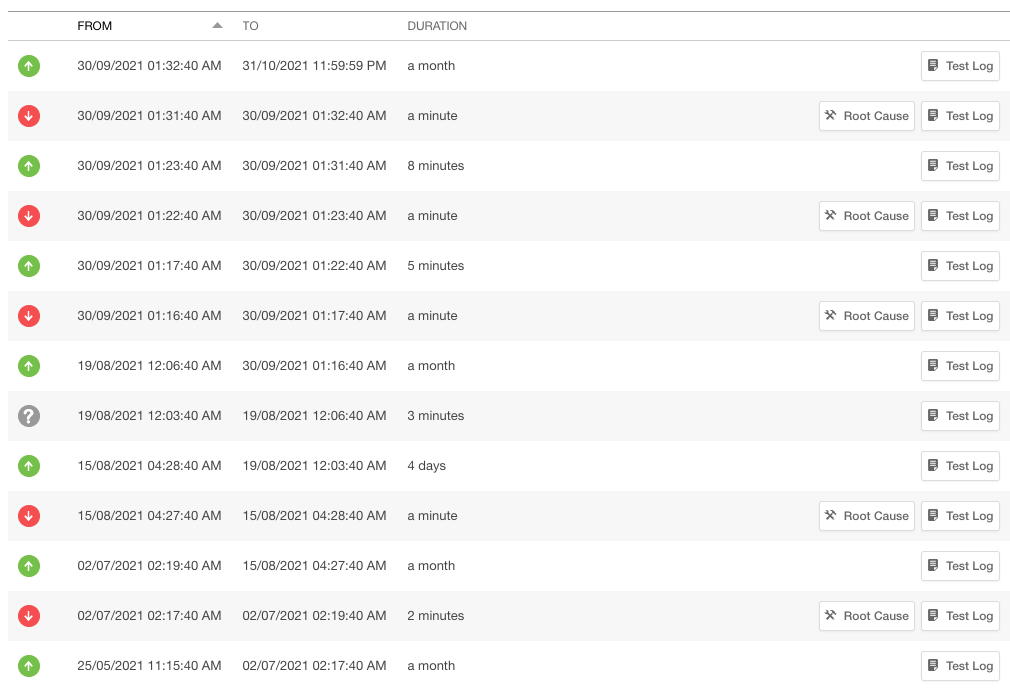
And a partial log of downtime for the past 10 months.

One thing you’ll notice is that many of the outages were pretty short. They’re also typically early in the morning for our timezone. When we did some digging into this, we couldn’t find any issues that matched the downtime. We speculate that these might be network connectivity issues, ie there are no problems with our platform but the tools checking the platform weren’t able to connect.

Why Uptime is a terrible measure

It’s actually quite easy to achieve very high uptime, at least for some websites. All you need to do a find some simple hosting for static files (eg AWS S3), then put a CDN in front of it (eg Cloudflare or Cloudfront). Then your uptime basically matches the uptime of your CDN.

Given that uptime is the core business of a CDN, the uptime tends to be incredibly high. Cloudflare’s enterprise agreement says:

The Service will serve Customer Content globally 100% of the time.

https://www.cloudflare.com/en-gb/enterprise_support_sla/

So for a simple website, you should be approaching 100% uptime.

Uptime also doesn’t measure whether your website actually works. The uptime measure could tell you everything is fine, even if people can’t log into your platform. It’s a measure about whether your website is there, not whether it works.

Why Uptime is a good measure

Given the limitations with uptime, why would you measure this? Well, it turns out that there is a bunch of useful things that an uptime measure tells you.

First off, assuming that the website is doing something more than just serving up static files, then this can be a useful measure. if your website does some work in order to respond to a basic check then it becomes a measure if whether your server or servers are available and working. Or at least working enough to respond to a basic request.

This means that it’s a measure of whether your servers are working 24/7. It doesn’t cover everything, but it does give you a basic indication of health. In our case at Bench, every request is coming back from our servers.

It also measures whether you can deploy new versions of software without taking your platform offline. I’ve worked at some companies where a deployment to production meant hours of downtime for each deployment.

This is also a basic measure of the quality of your infrastructure. What is the uptime of your underlying providers?

Finally, it’s a basic measure of code quality. Does your code work enough to continue to respond after each deployment? Does it scale so that it still responds under high load?

How we achieved this

This didn’t happen overnight, it was the result of quite a bit of work across quite a few different areas. Each of these is worthy of a blog post by itself, but this is a quick introduction.

Infrastructure

The infrastructure itself needed to be resilient and gracefully handle any failures. This meant multiple servers on AWS, with a load balancer routing traffic to them. The infrastructure also automatically scales up to handle any increased load so that we can continue provide a stable platform.

The other main layers of the platform (DNS – Cloudflare, DB – MongoDb on Atlas) also needed to be stable enough to provide solid uptime.

Deployments

Over that 10 month period, we deployed the platform into production 57 times, through either planned deployments or a hotfix. Suppose we had 5 minutes of downtime for each deployment, that would mean 285 minutes downtime over the 10 months. Even a more modest 1 minute of downtime would mean 57 minutes of downtime. So clearly you need a really solid deployment process to avoid downtime.

In our case, we implemented a partial blue/green deployment, where we:

  • deploy new code to new servers
  • add new servers to the pool
  • wait for them to warm up and become healthy
  • remove the old servers

So far we’ve only had 3 minutes of downtime caused by a deployment (the deployment process had a minor glitch).

Quality

The hardest part of this is to ensure that software you’re delivering into production actually works. You can have amazing infrastructure, with an amazing deployment process, but if the quality if the code isn’t there, it’s all for nothing. Of course you could just never deploy new versions of code, but then you’re not delivering new value for your customers.

You have to build quality into the entire process of building software.

One small bug written by any of the developers that slips through into production can take your entire platform down. We haven’t been immune from this. We had a couple of major issues in November 2020 which caused some disruptions of the platform from a couple of bugs we missed. Each time we learnt from the issue, the same way we have learnt from past failures, and in turn we’ve fed this back into the process.

We now have a combination of:

  • code reviews
  • automated tests and semi manual regression tests to ensure that the platform works
  • continued emphasis on quality to ensure that everyone in the team values it

Process

This might be surprising, but you need the processes in place to support building working software. How do you ensure that code is reviewed and tested before it goes into production? We use a structured process driven by Jira to ensure that every piece of work goes through all the steps that ensure quality.

We’ve adopted a Microservice strategy and one side effect of this is if you miss deploying a service, you could introduce problems. So you need a process to ensure that deployments pick up all of the changes. In our case we have a shared wiki page in a standard format for each deployment and a couple of 5-10 minute meetings to make sure we’ve picked up everything that needs to be deployed.

Conclusion

Uptime can be a really useful indicator of the overall health of not just your platform but also your processes for building and deploying code. At Bench we’re still aiming for 100% uptime even if we haven’t quite got there yet.

Introducing Changed.Page

I’m excited to announce something I’ve been working on for a little while: Changed.Page. This is a platform that notifies you when web pages change. Every day this checks pages to see if they’ve changed and send you an email if they have. It’s that simple.

I’ve been using this myself for a little while, and now you can too.

The website is at: https://changed.page

I’m going to try to cover as many questions about this as possible.

Why did you build this?

This was born of frustration. In my day job we use a number of APIs that change, but there was no way to be notified of the upcoming change. While there might be a blog post or a release notes page, there was no way to get notified they had changed. This was and still is extremely frustrating.

While the companies that provide the APIs could simply notify people of the changes in advance, they didn’t. Or they force you to log into their platform to get updates. Either way it meant manually checking pages to see if there was an update.

It seemed like such a waste of time to manually check the pages. It was crying out to be automated. So I built this.

How does it work?

In a word: serverless. I saw this as a real opportunity to build something interesting using serverless computing. Serverless provides the promise of allowing you to write code without worrying as much about how it gets hosted. It means you no longer have to deal with building servers, whether they’re cloud based VMs or physical servers. It means no more patching required.

Serverless also provides a much better way to scale out based on load. Under most models of hosting, as load increases you scale out with more servers, typically based on things like increased CPU load. However it takes time to provision new servers, deploy the software and start handling the load. Often it also takes time before the servers are fully operational and “warm” enough to perform well.

Serverless allows new resources to be added in smaller increments. Rather than adding a server, you add just what you need, when you need it.

It’s also a very cost effective way of hosting a platform. It means you only pay for the resources you use. If the load isn’t constant, then serverless is a great way to manage that load. And in almost all cases, load is not constant.

I’m going to write a few follow up posts about how this has been built.

Other questions

What are you doing with my email?

We’ll send you emails when pages change or updates about improvements to the platform. That’s it.

Why is there a limited set of pages to monitor?

I’m not ready to open this up to monitor any and every web page. I’m not 100% sure how people might use this at this point if it’s totally open. That could change in future.

How is this different from archive.org?

They have a different focus. Archive.org aims to provide a comprehensive digital library. Changed.Page just looks to send a notification when something changes.

How will you make money from this?

I won’t. This a free service because I think it’s valuable for other people. For reasons I’ll go into later blog posts, this should cost close to zero.

Where will this go?

I’ve built this because it solves a problem for me. At the same time, I think it might be helpful to other people. If I had the problem, other people might also.

So where it goes from here? I’m really not sure but I definitely expect to keep adding more pages to be monitored.

I’m happy to keep improving this to continue to make it useful. If you’ve got any suggestions, feel free to get in touch at [email protected].

Difficult Decisions

decisions

Many times in your career or your personal life you’ll face difficult decisions. When you face a decision where the consequences of making the wrong decision are serious. You feel sick in your stomach as you think about even making the decision.

So how do you make the decision?

The first thing to acknowledge that it’s often less about the decision itself, it’s more about  the consequences of the decision. Deciding what to wear is a trivial decision, but it might not feel so trivial if you’re going to give a speech to 1000 people. Then you might really care about what your clothes.

When I face difficult decisions, I find it helpful to be able to understand what kind of decision it is. Putting the decision into a box helps you better understand how to handle making a decision.

I see difficult decisions falling into three basic categories.

Hard to call

These are decisions you’re genuinely not sure what the right decision is. You’ve done the analysis, written lists of pros and cons, asked for advice, run scenarios over the different outcomes, and … it’s still a 50-50 decision.

So what do you do?

This is actually really simple: you flip a coin.

If you genuinely cannot choose between two options, then it isn’t worth the time to agonise over it. Choose at random and move on. Put your energy into your chosen path rather than agonising over the decision.

If you find out later you made the wrong decision based on new information, rest easy. You can only make decisions based on the information you have at the time.

Not enough time

This is a decision with a time limit. If you don’t make a decision soon, you’ll miss an opportunity or suffer some consequences.

You don’t have the time to gather enough information to feel comfortable you’re going to make the right decision. What do you do? You simply don’t have enough information to be sure you’re going to make the right decision.

You need to recognise also that not making a decision is still a decision, it’s just a decision to do nothing. You will always be forced to make a decision, even if that decision is to delay making a decision. You need to seriously consider whether deciding to delay is better than actually making the decision.

Not making a decision is almost always worse than making a decision. Often your initial reaction is the best one, so make the decision and move on.

Decisions With Consequences

These are the decisions where you know what the right choice is, you just don’t want to do it.

This is the kind of decision where you find out that someone senior at work bullying a junior staff member, and it’s not the first time it’s happened. You know that you should speak up, you know it’s the right thing to do. Maybe you just aren’t sure if it will make any difference. You might be seen as someone who isn’t a team player. Maybe you’ve seen what happens to people who speak up.

It could be something more personal, something closer to home. You discover a well liked family member is abusing their spouse. If you speak up, that would make you very unpopular and create a real divide in the family. Maybe it would be simpler to pretend you hadn’t seen anything? Or that you might have been confused.

It’s the kind of situation that can make you feel sick in the pit of your stomach. You know what you should do, but you fear the consequences.

When you’re faced with a decision like this, the only real choice is to do what you know is right. You need to live with the consequences of your decision.

However, you can be wise how you do this. You can collect evidence, ask others for advice and prepare how you want to approach it. Maybe you can find some allies. You can choose how and when to address the issue. Take the time to manage the impact of your decision.

Conclusion

When making decisions, I find it gives me comfort to be able to understand what sort of decision you’re facing. If in doubt, aim for making a faster decision over a slower decision. For 2 out of the 3 types of decisions a faster decision is the best option.

Most useful skills in technology

Over time, I’ve developed some pretty strong views on what skills are most useful in technology. I’ve developed these from 20 years of experience in different roles from hands on development, staff management and strategic leadership positions.

Without a doubt, the two most important skills are:

  • The ability to learn
  • Communication

These two skills are far more important than skills in a particular technology, language or certifications and it’s well worth concentrating on developing these skills above others.

Why are these skills so important? Let me explain.

The ability to learn

The one certainty in technology is change. As Stewart Brand says:

Once a new technology rolls over you, if you’re not part of the steamroller, you’re part of the road

The rate of change in technology is relentless. For example, in my career I’ve seen us move from:

  • physical machines to
  • virtual machines to
  • containers and now to
  • serverless.

In any other industry you would see just one of those changes every 20 years, in technology, it’s more like every 5 years. While this example is more infrastructure focussed, the rate of change is just as high across the whole industry. Changes aren’t limited to new technologies, processes change too. How we build software and communicate about it, have changed completely

In order to thrive in constant change, you need to be able to learn, and learn fast.

What does this mean for you? If you are in technology, you need to build this skill by exercising it. The best way to do this is to learn new things. Take the time to learn a new language or platform. Even better, teach someone else a new technology. Teaching someone else forces you to learn this better than you otherwise would.

If you are managing a team, you need to think about what people you bring into the team. You should hire for the ability to learn over current hard technical skills. Look for how people demonstrated the ability to learn in their career. The skills you are looking for now are less valuable than the skills they will learn.

Communication

Communication is a much underrated skill. People tend to focus hard technical skills over softer skills. This isn’t helped by the image many have of people technology: the brilliant lone coder, hunched over a keyboard, building the next facebook.

The reality is that software development is collaborative. The broader technology space is just a collaborative, as no single person has all the skills to build the kind of complex products that are used today. That takes a team.

For a team to collaborate effectively, communication is key. Communication skills help other team members to understand what the work is and how each person is contributing to that. Without communication work is duplicated and people head off in different directions rather than working towards the same goal.

Communication is equally important outside the team. This can help bridge the gap in understanding with less technical people, so that they can better understand how to work together. For example, if there is good communication between a sales team and a development team, then the sales team isn’t going to over promise beyond what can be delivered. Well, at least they’re less likely to.

At some point, you will need to convince someone of an idea or proposal. Often you will need to sell the idea to people who might not truly understand the technical details or agree with you. Communication skills will help you pitch the idea and translate your proposal into the language your audience understands.

So, how do you build those skills? Look at other people who communicate well and see what you can learn from them. Ask for feedback on how you can improve. Follow up with people later to see whether they understood the idea you were trying to communicate.

Consider how you best communicate (face to face, written text, diagrams?) and look at how you can improve areas where you are weaker. If you have something particularly important to communicate, consider leaning on areas where you are strongest.

Above all, practice, practice, practice.

Summary

If you are looking to be more effective in technology, you should look at building your ability to learn and communicate. These skills transcend almost all other skills and will serve you throughout your career, far beyond any hard technical skills you might learn.