
A week ago I started building my PIM and I have a status update to share:
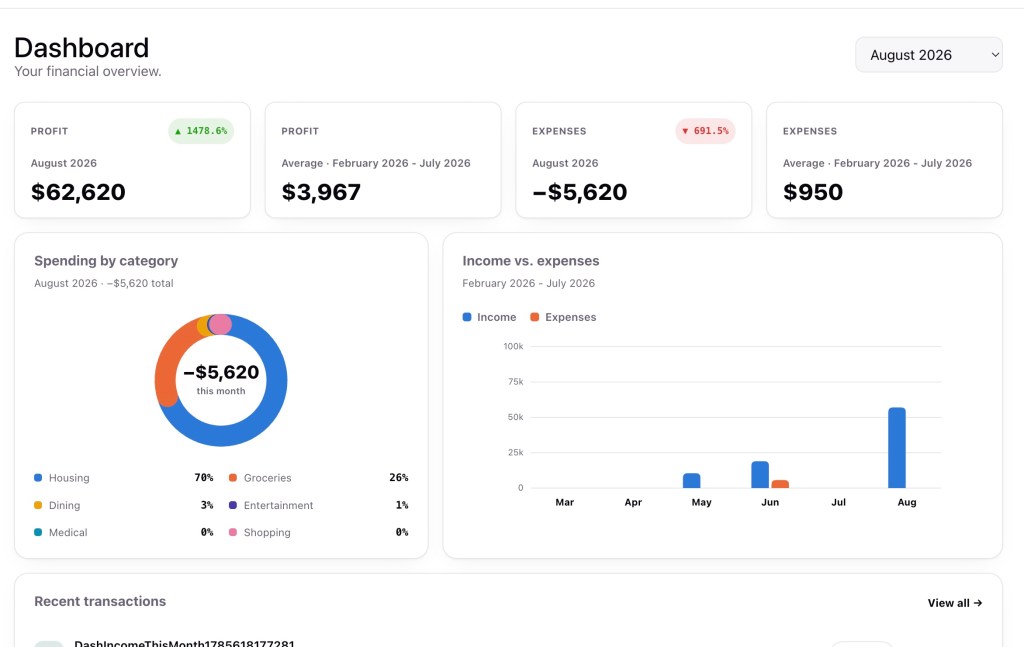
In a little over a week, working a little in evenings, but mostly on weekends I have a pretty functional PIM.
In this age of vibe coding, this might seem a little slow, however this was built to be a well structured app. This was built to be a scalable, cloud hosted app that could run at zero cost, leaning on the AWS free tier.
How I built this
I built this the way that I would build an app manually, just that I got Claude to do the actual work for me.
- carefully designed infrastructure, running on the platform of my choice (AWS)
- Comprehensive automated tests (Unit, Integration and Functional tests)
- CI/CD (Github)
- Code reviews — i.e. getting the squishy human to review the code Claude wrote
- Issue tracking (Linear)
Issue tracking, seriously?
Yep, I created tickets for almost everything I build before I built it. This might seem like overkill, but I found it helpful in three main ways.
Better discipline
I often have ideas of things I’d like to do, fix, or change in future while I’m mid-task. Writing these down as tickets means I don’t break my current flow of work, so it stops me churning without achieving anything. Often I’ll create a placeholder ticket, then fill it out properly later.
Able to work anywhere
Ticket writing also works well while I’m waiting for Claude to finish another task. I can create and edit tickets on my phone, so if something occurs to me when I’m not at my computer, I can capture it straight away instead of losing it.
Able to prioritise the work
Lastly, tickets make it much easier to prioritise. Often I’ll have an idea for a change that feels pretty important in the moment. In the cold hard light of day, it can become clear that it’s just not as urgent, and I can move it down the priority list.
What this looks like as a workflow
This mostly used a worklog workflow, which is similar to the process described here: https://nimbalyst.com/blog/claude-code-plan-mode/ — it argues for using Claude Code’s plan mode to agree on a concrete, file-specific approach before any edits happen, then keeping that plan as a persistent artifact you can check the implementation against.
The basic workflow is:
- Get Claude to create a plan that is committed to the repo. The plan should include a checklist.
- Work through the checklist implementing each step. Collect all prompts and responses in the worklog.
- When complete, raise a PR
This means the tickets can include a bit of detail on what you want to implement. Claude fleshes this out into a plan. You review the plan and confirm at each step.
Timeline
1-2 days
I had a login page that didn’t work. This might not seem much progress, however there was a lot behind that. This gave me:
- the shell of a front end project, complete with unit tests
- the shell of an api project, with a couple of endpoints implemented, complete with unit tests.
- integration tests against the API
- placeholders for actual pages to be built
- a front end and API login process that worked on my machine
- Fully built AWS infrastructure, including front end served through the CDN, api served by Lambda, data stored in DynamoDB
- working CI/CD pipelines in github to build, unit test and deploy changes (including TF infrastructure)
- an almost working site in AWS
This is the reverse of the way you’d build a vibe coded app: building the infrastructure first.
3-7 days – limited progress to work in evenings
I had a transaction listing page, which included:
- fixing the login bug (turns out I was missing an egress rule in the Security Group)
- A process to upload and process transactions from bank accounts
- Storing the transactions
- Classifying the transactions, including storing classifications for transactions
- Classifying incoming transactions
8-9 days
I have a fully functioning dashboard, including:
- I had fully completed the transaction classification process, including identifying transfers
- able to reclassify transactions
- dashboard summary of income, expenses
- dashboard month by month comparison
- switched to using QIF files rather than CSV as it meant supporting less file formats
Conclusion
After 9 days I had a well architected, scalable platform that would run at zero cost, fully built by Claude on pro plan.
This was possible because while Claude wrote the code, I designed the architecture and reviewed the implementation. There were multiple occasions where Claude took the wrong approach and needed to be corrected. For example, the initial handling of environments for terraform was poor, but easily corrected when identified.
I still need to work through automating the bank data import. At some point in the future I might create a mobile app for this. I might even open this up to a wider audience.
 uberconcept - David Cameron's Blog